Who Forge Learn serves
Built for directors, instructors, and learners
Directors start with courses they already have
Bring your existing courses into Learn quickly, no IT required. When you need something new, Course Builder helps you build it.
Instructors see who needs them
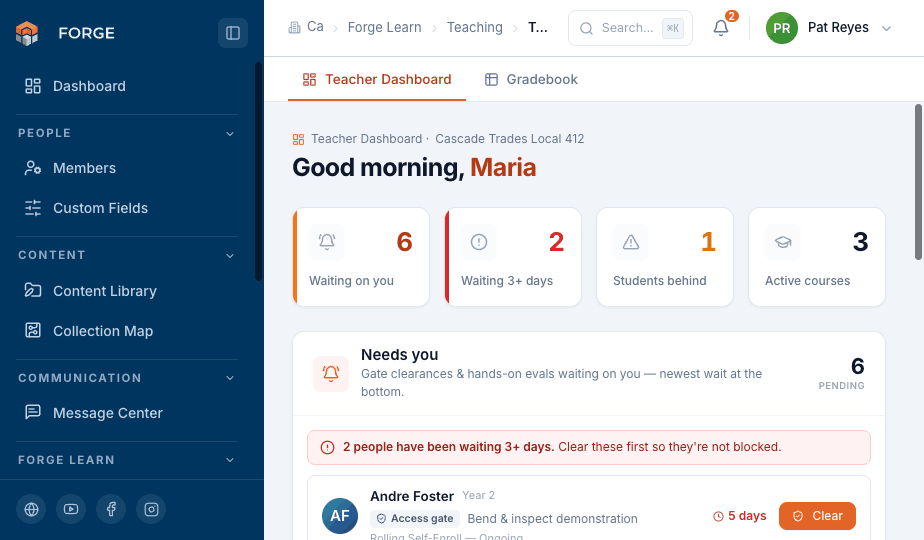
A dashboard lists the learners waiting on an instructor, with a gradebook for each session and in person approvals that count toward completion.
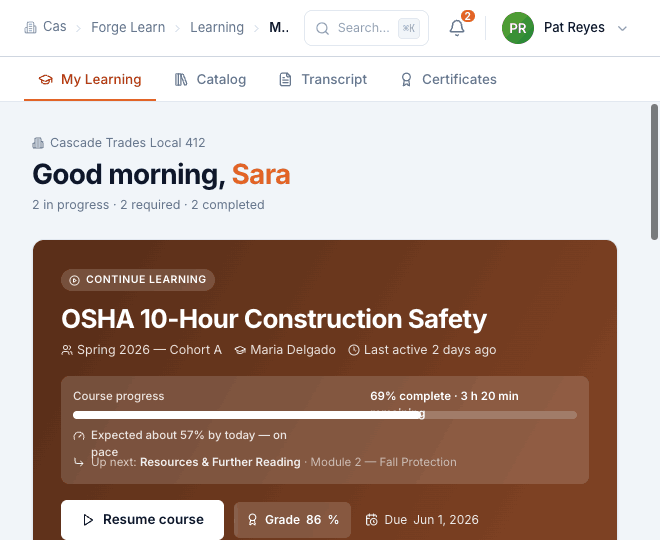
Learners see their progress
Learners get a clear experience under your union's brand, with accurate progress, visible requirements, and certificates issued automatically. Every learner has a complete transcript of everything they've earned.
Course creation
How directors put the courses they already have to work
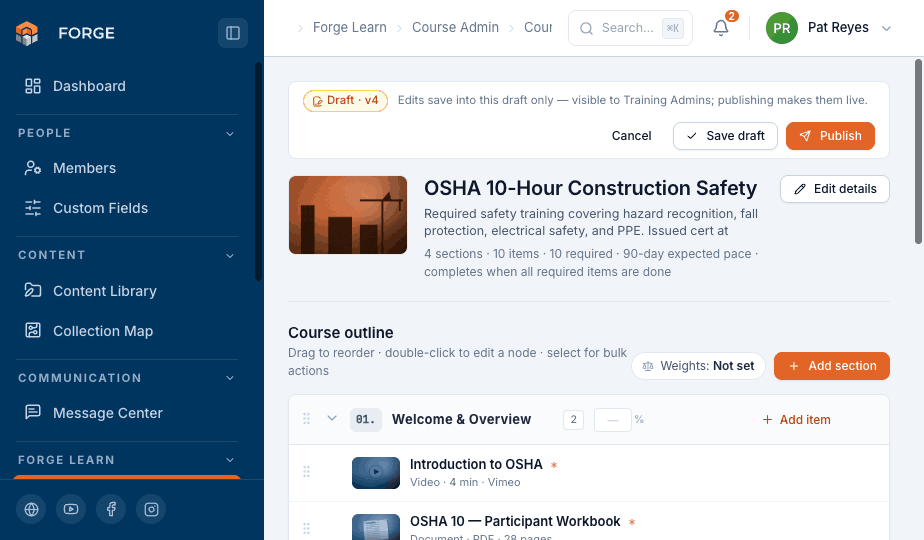
Directors can upload the courses they already have and put them to work in Learn quickly, with no technical help.
When they want to build something new, Course Builder handles it. You get comprehensive item types, including lessons, video, documents, quizzes, SCORM 1.2, web links, practical evaluations, access gates, and certificates, plus quizzes with pass thresholds and attempt limits.
Instructors
How instructors verify practical skills
Instructors do not need to search through rosters. The teacher dashboard opens on a list of approvals and practical evaluations waiting for them, with the longest waits highlighted and the gradebook one click away.
- A queue of pending approvals that instructors can clear or grade in one step.
- Insight into learners who are behind, including where they are stuck and why.
- A gradebook for each session across every course an instructor teaches.
Training compliance tools for unions and training funds
Lock a course across locals
Share a template with all locals or selected ones. Locals get an editable copy, or a locked copy when compliance requires it. Every local is notified when the template changes.
Remind learners before training is due
Assign courses to individuals or groups. Learners are reminded 30, 14, 7, and 1 day before a due date by push notification or email, and overdue training goes straight to administrators. The requirement follows the learner, so a completion in any session counts.
Preserve earned credit
Credit learners have already earned stays in place when a course is updated. Completed work remains on the learner's transcript, so administrators can improve a course without resetting prior progress.
Answer audits with confidence
Versioned courses, release notes, amendment records, and a transcript for every learner keep a complete history without extra paperwork.
Forge Learn compared with a generic LMS
Forge Learn vs. a generic LMS for union training
Most learning platforms were designed for corporate HR departments or college classrooms. Here's how Forge Learn compares for unions and training funds.
| What your organization needs | Forge Learn | Generic LMS |
|---|---|---|
| Run training for every local and chapter from one shared structure | Built in | Requires workarounds |
| Keep shared courses identical across locals when compliance requires it | Built in | Not available |
| Confirm practical skills with an instructor before learners advance | Built in | Not available |
| Update courses without affecting credit learners have already earned | Guaranteed | Varies |
| Make sure required training is finished by its due date | Built in | Often sold separately |
| Offer both scheduled cohorts and rolling enrollment | Both supported | Varies |
Frequently asked questions
Common questions about Forge Learn
What is Forge Learn?+
Forge Learn is a learning management system built for unions and training funds. It helps you build courses, deliver them consistently across every local, and track learner progress from orientation through journeyman status.
How is Forge Learn different from a generic LMS?+
Forge Learn is built around how unions are organized. It serves locals, district councils, and internationals. Shared courses stay identical where compliance requires it, and practical skills are confirmed by an instructor before learners advance.
Can we keep courses consistent across every local?+
Yes. Locals, district councils, and internationals can keep a course identical wherever compliance requires it, and a local can add its own training alongside that course.
What content formats does Forge Learn support?+
You can deliver video, documents, quizzes, SCORM packages, and practical evaluations in one place, for scheduled cohorts or rolling enrollment.
How are skills verified?+
Practical evaluations and access gates need a qualified instructor's approval. A completed qualification means the learner has demonstrated the skill in person, not just clicked through a lesson.
What happens to earned credit when a course is updated?+
Credit learners have already earned is never affected when a course is updated. Changes stay in a private draft until you publish a new version, and every version keeps release notes for your records.
See Forge Learn with your own course
Schedule a walkthrough of about 30 minutes with our team. Bring a course you run today, and we will show you how it works in Forge Learn.